Subscribers (Entity Listeners) in TypeORM with NestJS
Introduction
Recently, I was assigned a task in my team to capture audit logs for changes made in the database. This includes tracking the creation, updating, and deletion of different entities to monitor changes effectively. I was given a reference to the Laravel Audit Log package, which made it easy to log these actions in Laravel applications.
Curious about similar solutions for Node.js, I searched for libraries that could provide this functionality. However, I didn't find anything that met my needs. This led me to explore NestJS event subscribers, which can be utilized to implement an audit log system. By using subscribers, I could listen for changes in the database and log them accordingly, giving me the flexibility to track all necessary actions.
In modern web applications, managing side effects related to database operations is crucial for maintaining data integrity and enhancing user experience. TypeORM provides a powerful feature known as Subscribers (or Entity Listeners) that allows you to listen to specific events triggered by entity lifecycle changes. This post explores how to implement subscribers in a NestJS application using TypeORM, enhancing your application's data management capabilities.
What are Subscribers in TypeORM?
Subscribers are special classes in TypeORM that can listen to various events related to entity lifecycle changes. They allow you to hook into events like:
Before Insert
After Insert
Before Update
After Update
Before Remove
After Remove
By using subscribers, you can execute custom logic before or after these events, making it a great tool for tasks like logging, validation, and automatic population of related entities.
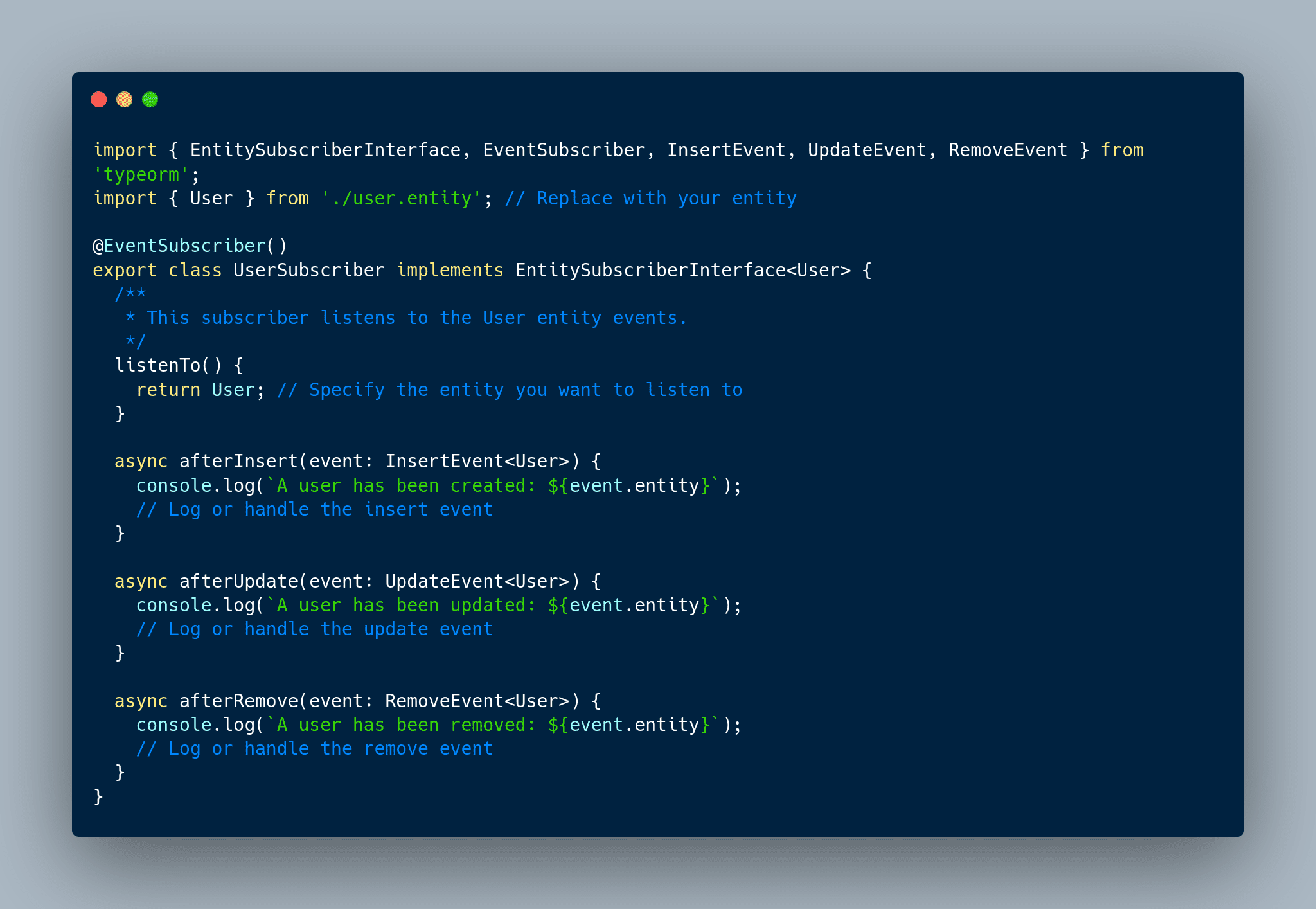
Example Subscriber Setup
`To create a subscriber, you need to define a class and register it in your module. Here's a simple example:`
Listening to All Entities with a General Subscriber
In TypeORM, subscribers are typically used to respond to events for specific entities. However, you can create a general subscriber to listen to events for all entities by manually registering it with the DataSource. Below is an example of how to implement this:
- Manual Registration: By using dataSource.subscribers.push(this);, the GeneralSubscriber registers itself with the TypeORM DataSource. This allows TypeORM to recognize and invoke its event handling methods during insert, update, and remove events.
- Listening to All Entities: This approach enables the subscriber to handle events for all entities without needing to specify them individually. This is useful for implementing cross-cutting concerns, such as logging or auditing, in a centralized way.
With this setup, any changes made to any entity will trigger the corresponding methods in the GeneralSubscriber, allowing you to efficiently manage entity lifecycle events across your application.
Capturing User and Request Information for Audit Logs
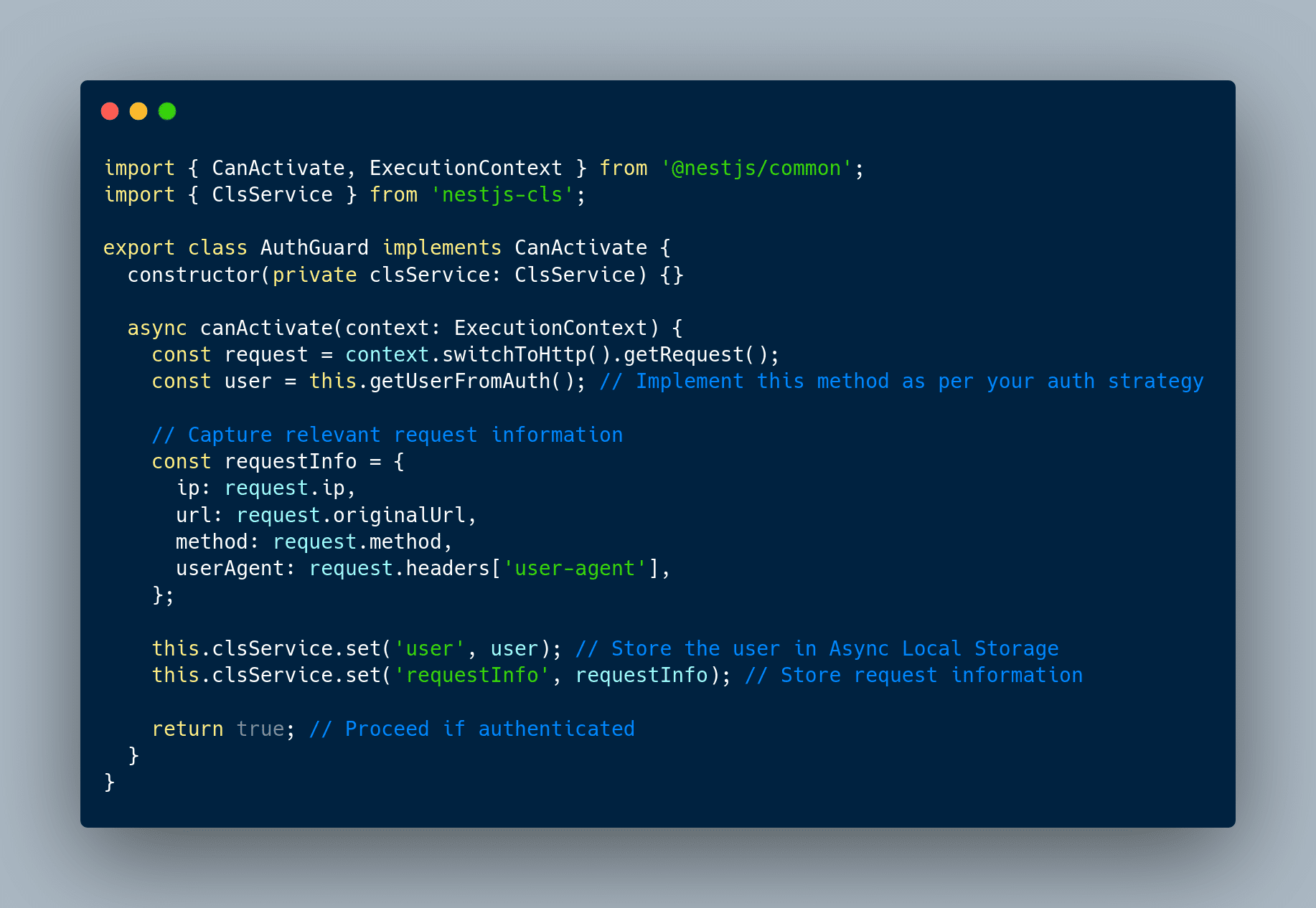
To create a comprehensive audit logging system in our NestJS application, it's essential to capture both the user responsible for changes and relevant request information, such as the user's IP address, request URL, method, and user agent. This information provides crucial context for each logged action.
To achieve this, we can use Async Local Storage. This feature enables us to store and access data across different parts of our application seamlessly. Here's how to set it up:
- Install the Required Package: Choose your preferred package manager and install the nestjs-cls package:
npm install nestjs-cls
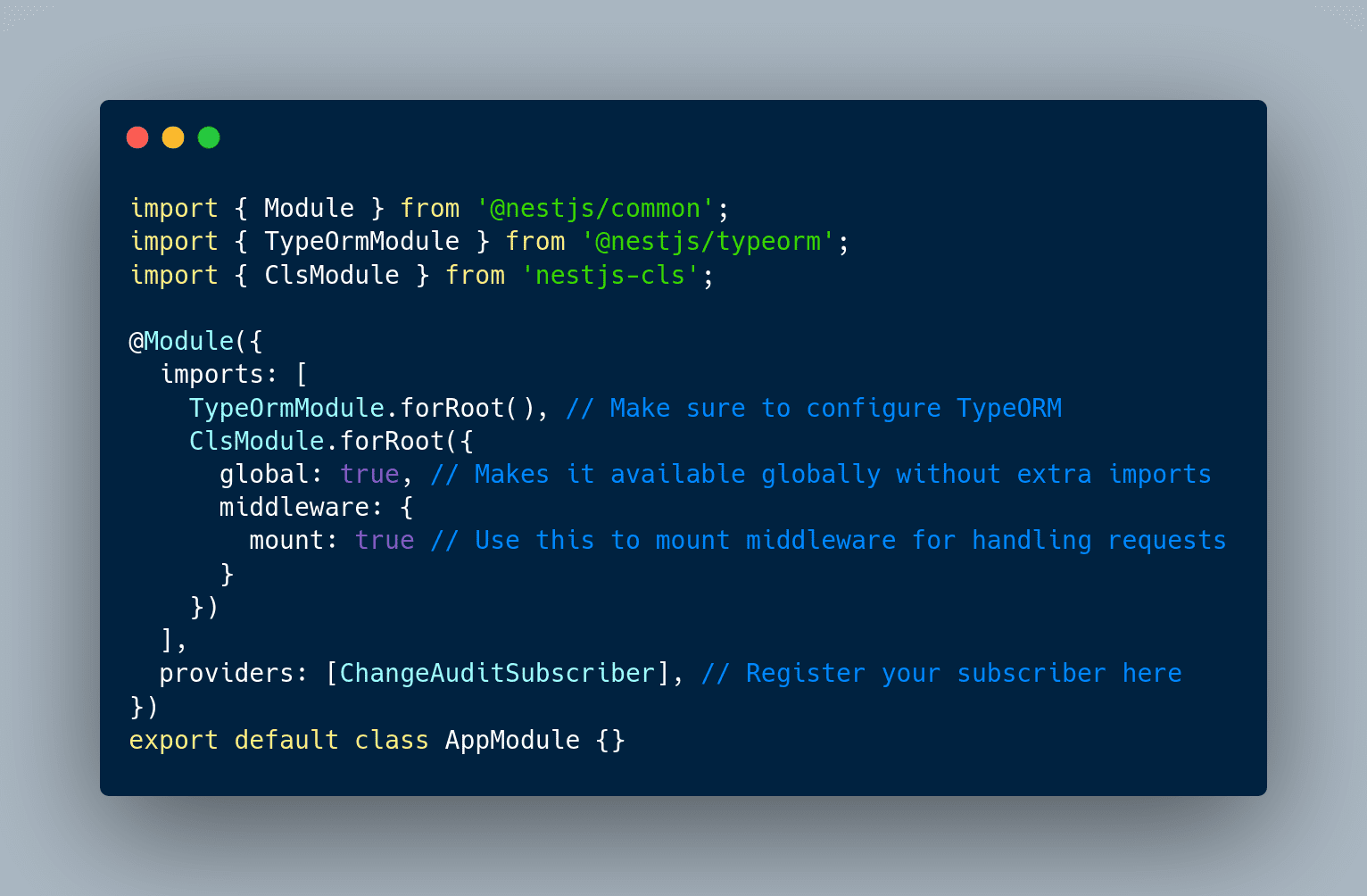
2. Configure in App Module: Next, configure the ClsModule in your app.module.ts to make it available throughout your application
3. Setting the Current User and Request Information: To track changes made by authenticated users, we can set the current user in our AuthGuard:
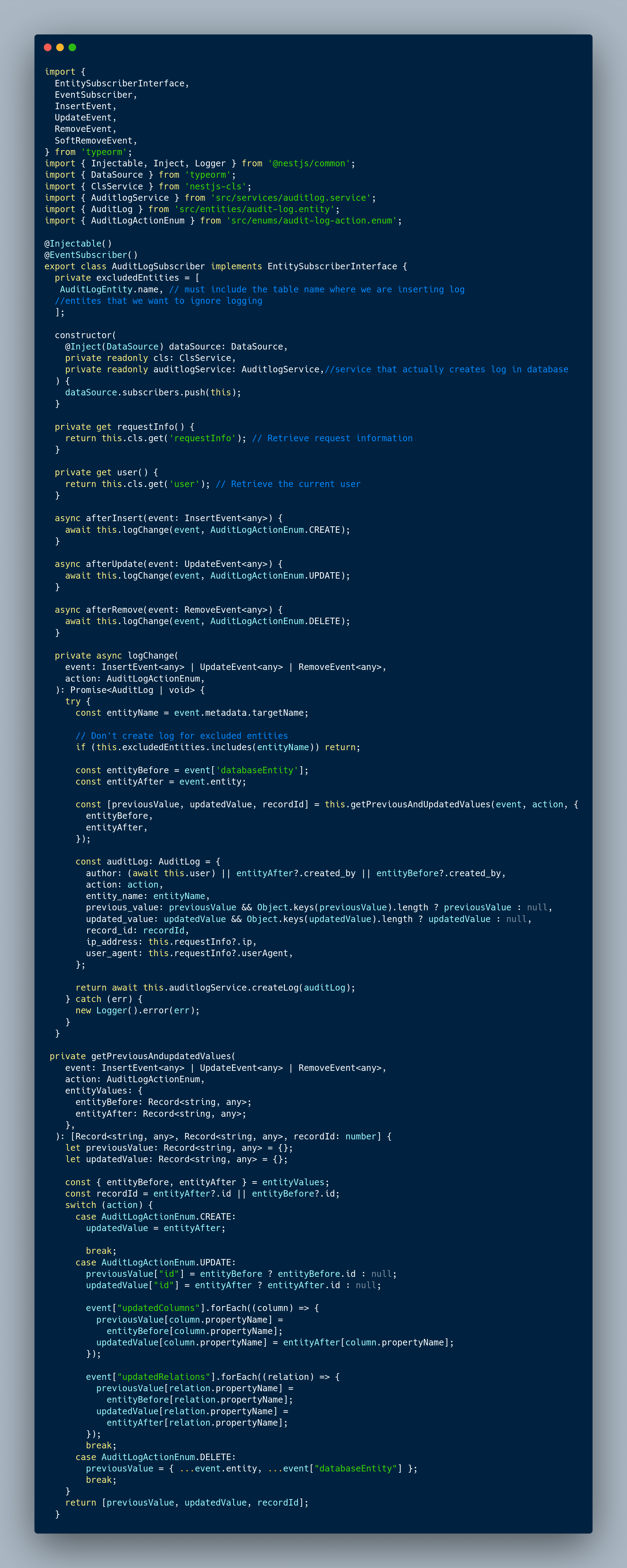
Bringing It All Together: Simple Audit Logging in NestJS
In this section, we consolidate the concepts and implementations discussed earlier to create a simple audit logging system using TypeORM subscribers in a NestJS application. We integrate the ability to listen for entity lifecycle events - such as creation, updating, and deletion - while capturing essential user and request information for each logged action. By employing Async Local Storage, we ensure that we can track the user responsible for changes and relevant request details seamlessly.
Conclusion
While this approach provides a foundational method for implementing audit logging in a NestJS application, it's important to note that it may not be the best or ultimate solution for every scenario. It serves well for smaller applications with simple logging requirements, but there are opportunities for optimization and enhancement.
One crucial aspect to remember is to always interact with the database using entity instances when saving, updating, or deleting data in TypeORM. Failing to follow this practice can result in subscribers being triggered without the proper entity values, leading to incomplete or misleading logs.
I also encountered some challenges during implementation, such as the @AfterUpdate lifecycle hook consistently indicating that an array or JSON field was updated, which can obscure the specific changes made. Additionally, integrating logging with queue services can introduce complexities, as these operations may not easily lend themselves to traditional logging mechanisms.
As you explore and refine your logging strategy, I encourage you to consider alternative methods or tools that may provide more robust solutions, particularly for larger or more complex applications. Continuous improvement in logging practices will help ensure that your application's audit trail remains clear and comprehensive.